Excel 메모리 초과 문제
문제
Globa 프로젝트에서는 모르는 단어를 검색할 수 있는 기능을 제공하고 있습니다.
그렇기에, 우리말샘에서 제공하는 Excel 파일을 사용하여 모든 단어(1,173,850개)를 DB에 저장하는 작업이 필요합니다.
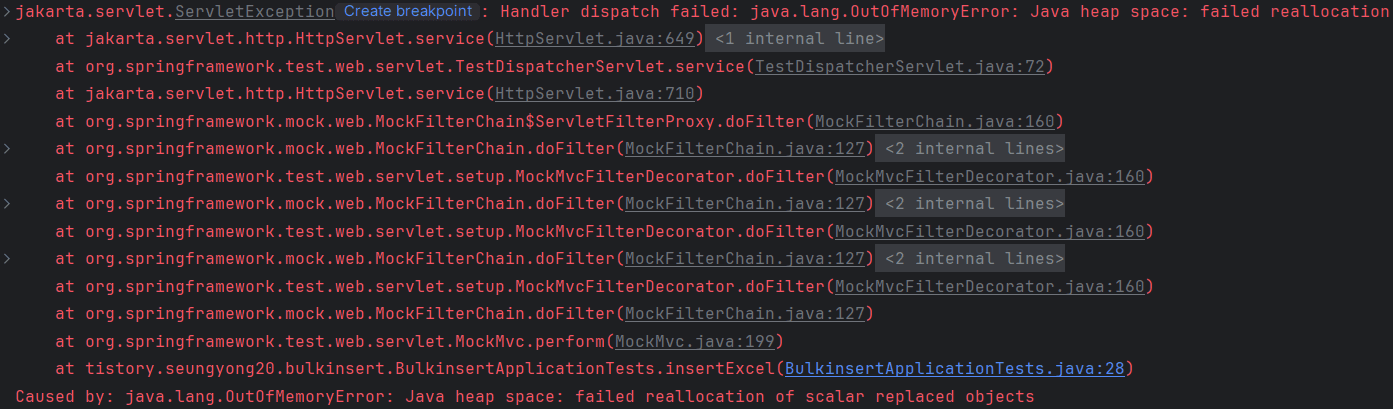
Excel 파일을 파싱하여 단어를 DB에 저장하는 작업 중 메모리 초과 문제가 간혈적으로 발생하였습니다.
원인
@Service
@RequiredArgsConstructor
public class CreateDictionaryService {
    private final Excel excel;

    private final DictionaryRepository dictionaryRepository;

    @Transactional
    public void create() {
        List<DictionaryDto> dtos = excel.getDictionaryDto();
        dictionaryRepository.deleteAll();
        dictionaryRepository.saveAll(dtos);
    }
}
@Component
@Slf4j
public class Excel {
public List<DictionaryDto> getDictionaryDto() {
List<File> excelFiles = getExcelList();
try {
List<DictionaryDto> dictionaryDtos = new ArrayList<>();
for (File file : excelFiles) {
// 모든 Excel 파일을 메모리에 로드하여 파싱하는 것은 비효율적입니다.
Workbook workbook = new HSSFWorkbook(new BufferedInputStream(new FileInputStream(file)));
Sheet sheet = workbook.getSheetAt(0);
for (int i = 1; i < sheet.getPhysicalNumberOfRows(); i++) {
Row row = sheet.getRow(i);
...
}
}
}
return dictionaryDtos;
}
}다음과 같은 원인이 있었습니다.
- JPA의
deleteAll()메소드는 모든 데이터를 메모리에 로드하여 삭제하는 방식으로 구현되어 있습니다. - JPA의
saveAll()메소드는 모든 데이터를 하나하나 저장하는 방식으로 구현되어 있습니다. - Excel 파일은 하나의 큰 이진 파일로 구성되어 있어, 한 번에 모든 데이터를 메모리에 로드할 수 없습니다.
해결책
1. 삭제하는 작업은 truncate를 사용하여 처리합니다.
@Modifying
@Query(value = "TRUNCATE TABLE dictionary", nativeQuery = true)
void truncate();
2. 저장하는 작업은 batch insert를 사용하여 처리합니다.
@Service
@RequiredArgsConstructor
public class CreateDictionaryService {
    private final Excel excel;

    private final DictionaryRepository dictionaryRepository;

    @Transactional
    public void create() {
        dictionaryRepository.truncate();

        // 잦은 재할당 방지를 위해 AtomicLong 사용
        AtomicLong num = new AtomicLong(1L);

        // 1000건 단위로 쪼개서 bulkInsert 실행
        excel.processExcelInChunks(1000, (chunk) -> {
            dictionaryRepository.bulkInsert(chunk, num);
        });
    }
}
public class DictionaryRepositoryImpl implements DictionaryRepository {
@Override
public void bulkInsert(List<DictionaryDto> dtos, AtomicLong idGenerator) {
// bulk insert
jdbcTemplate.batchUpdate(
"INSERT INTO dictionary(dictionary_id, kor_word, eng_word, description, category, pronunciation) VALUES (?, ?, ?, ?, ?, ?)",
dtos,
dtos.size(),
(PreparedStatement ps, DictionaryDto dto) -> {
ps.setLong(1, idGenerator.getAndIncrement());
ps.setString(2, dto.korWord());
ps.setString(3, dto.engWord());
ps.setString(4, dto.description());
ps.setString(5, dto.category());
ps.setString(6, dto.pronunciation());
}
);
}
}3. 파일을 읽는 작업은 StreamingReader를 사용하여 100건 단위로 처리합니다.
@Component
@Slf4j
public class Excel {
    ...

    public void processExcelInChunks(int chunkSize, Consumer<List<DictionaryDto>> chunkProcessor) {
        List<File> excelFiles = getExcelList();
        // chunk를 담을 자료형
        List<DictionaryDto> chunk = new ArrayList<>(chunkSize);

        for (File file : excelFiles) {
            log.info("Reading Excel file: {}", file.getName());

            // 파일을 메모리에 다 올리지 않고 버퍼 크기만큼만 읽음
            try (InputStream is = new FileInputStream(file);
                 Workbook workbook = StreamingReader.builder()
                         .rowCacheSize(100) // 메모리에 유지할 행 수
                         .bufferSize(4096)  // 버퍼 사이즈
                         .open(is)) {

                Sheet sheet = workbook.getSheetAt(0);

                for (Row row : sheet) {
                    // 첫 번째 행(헤더) 건너뛰기
                    if (row.getRowNum() == 0) continue;

                    ...

                    // 청크 사이즈에 도달하면 DB 저장 후 List를 비움
                    if (chunk.size() >= chunkSize) {
                        chunkProcessor.accept(chunk);
                        chunk.clear();
                    }
                }
            } catch (Exception e) {
                log.error("Failed to read Excel file: {}", file.getName(), e);
                throw new RuntimeException("Failed to read Excel file: " + file.getName(), e);
            }
        }

        // 모든 파일을 다 읽고 난 후, 자료형에 남은 데이터 저장
        if (!chunk.isEmpty()) {
            chunkProcessor.accept(chunk);
            chunk.clear();
        }
    }
}
264초 만에 완료되었습니다.
Note
MySQL과 MariaDB에서 bulk insert를 사용하려면 JDBC URL 뒤에 rewriteBatchedStatements=true를 추가해야 합니다.